How to swap faces in an image with Claude MCP and Medux

Use Claude and Medux through MCP to transfer facial identity between images while preserving the target pose and lighting. This guide keeps file roles and constraints in context, reviews the proposed call, and validates the returned result.

Claude returns the completed Medux face swap result
Claude completes the Medux task and returns a direct result URL plus a download command.

Claude-specific workflow

Run AI Image Face Swap as a Claude MCP workflow

Keep the goal, source assets, and constraints together in the conversation. Ask Claude to restate the source face image and target image, with each role clearly assigned before proposing the Medux image face-swap tool. That context checkpoint makes the file roles and desired outcome easy to correct before any Medux call is approved.

Claude prompt pattern

Using the assets and requirements in this conversation, help me swap faces in an image with Medux MCP.
Restate which input fulfills each role: the source face image and target image, with each role clearly assigned.
Propose the the Medux image face-swap tool call and summarize its arguments before asking for approval.
When it finishes, return the face-swapped image with a checklist confirming that the intended face is transferred while the target pose, lighting, and broader head remain consistent.

Context checkpoint

Have Claude summarize the intended transformation, identify every source asset by role, and list the important constraints. Review that summary together with the proposed tool arguments; correct the conversation first if a file, order, time range, or setting is ambiguous.

Result verification

Keep the Medux task ID in the conversation while Claude checks progress. When processing ends, ask for the face-swapped image plus a concise validation checklist confirming that the intended face is transferred while the target pose, lighting, and broader head remain consistent.

Capability boundary: This tutorial targets image face swap: it transfers facial identity while preserving more of the target head, pose, and lighting. It is a separate capability from head swap, which replaces the broader head region.

Workflow overview

Claude acts as the operator, MCP provides the connection, and Medux performs the image processing. You only need a source image, a target-face image, and a clear instruction.

Choose source image
Choose target face
Upload both files
Run Medux task
Download result

Before you start

Source imageThe main photo whose face will be replaced.
swap_face_src.jpg
Target-face imageThe image containing the face you want to transfer.
swap_face_target.jpg
Best practice: use clear, front-facing images with visible facial features and similar viewing angles for a cleaner result.

Step-by-step

1

Give Claude one clear instruction

Tell Claude exactly which file is the source, which file provides the replacement face, and that Medux should be called through MCP.

Swap the face in "swap_face_src.jpg" with the face in "swap_face_target.jpg".
Use Medux through MCP. Upload the files with curl, run the face swap, and save the result locally.
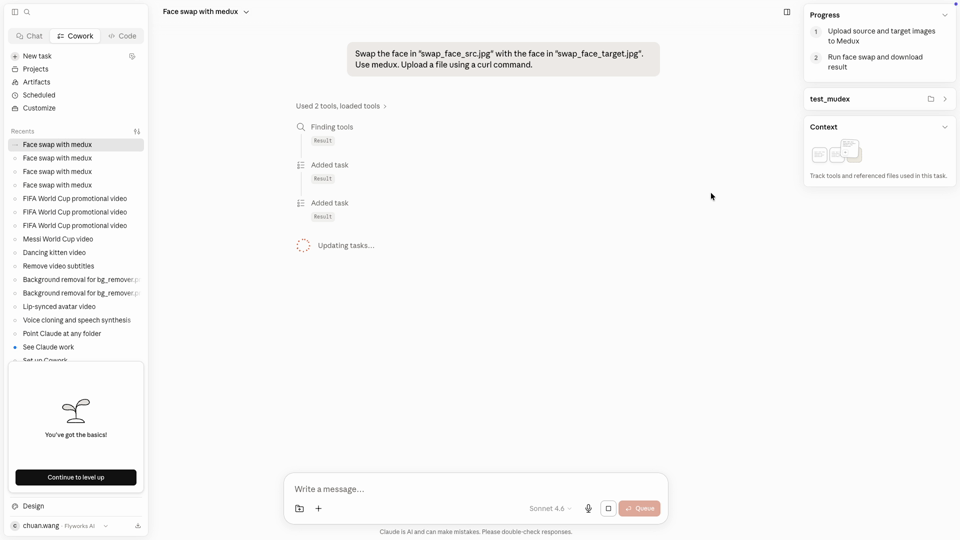
Claude face swap request
A concise prompt gives Claude the complete goal and the two input filenames.
2

Let Claude request upload URLs

Claude calls the Medux integration to create upload locations for both images. This keeps the transfer step inside the same workflow.
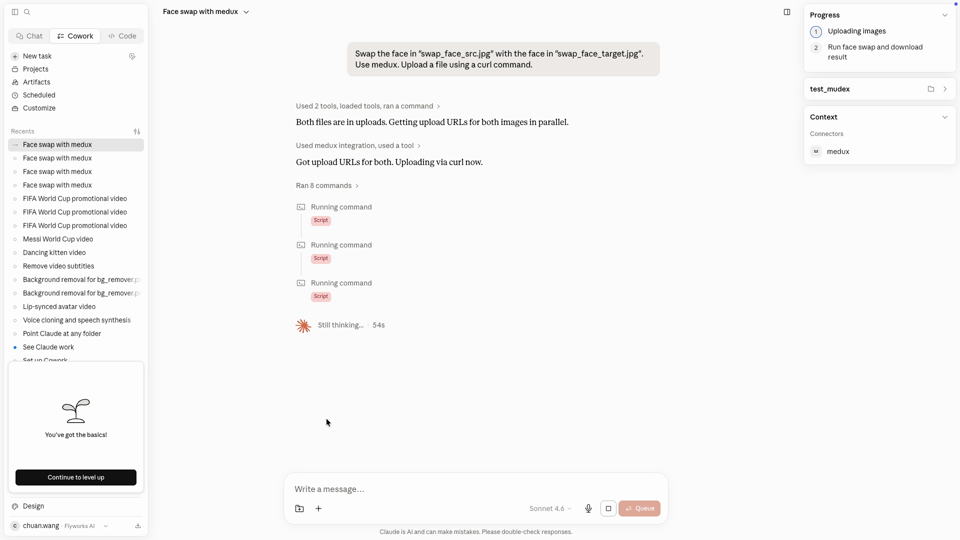
Claude requests Medux upload URLs
Claude obtains separate upload URLs and prepares both image uploads.
3

Upload both files with curl

The recording uses a short shell script to upload the source and target images. Keep paths quoted so filenames with spaces are handled safely.

curl -X PUT "$SOURCE_UPLOAD_URL"   -H "Content-Type: image/jpeg"   --data-binary @"/path/to/swap_face_src.jpg"

curl -X PUT "$TARGET_UPLOAD_URL"   -H "Content-Type: image/jpeg"   --data-binary @"/path/to/swap_face_target.jpg"
4

Run the Medux face-swap task

After both files are available, Claude submits the face-swap job to Medux and polls the task until processing is complete.
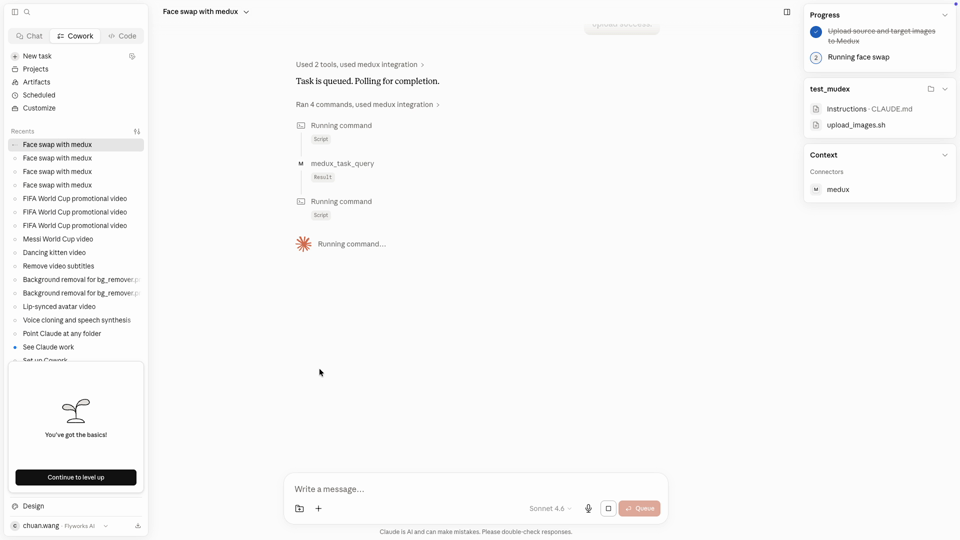
Claude handles the task orchestration. Medux performs the actual face replacement while preserving the rest of the source image.
Claude waits for the Medux face swap task
The Medux job is running and Claude continues checking its status.
5

Open or download the result

When the task finishes, Claude returns a direct result URL and a ready-to-run command for saving the generated image locally.

curl -L -o "/path/to/face_swap_result.png"   "$MEDUX_RESULT_URL"
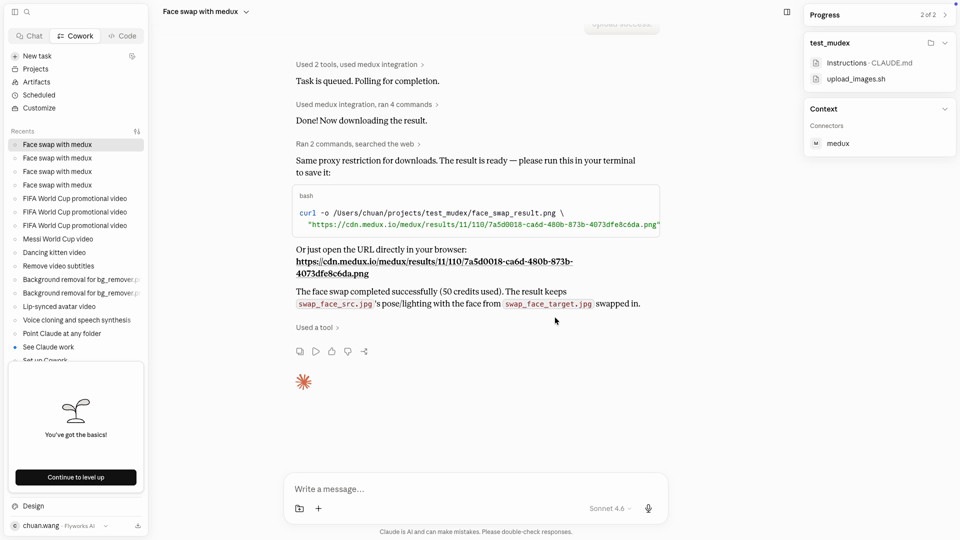
Claude returns the completed face swap image URL
The final response includes the result link, a local download command, and confirmation that the source face was replaced.

Example result

See the face-swap result

The three images below show the complete workflow: src is the original source image, tgt is the reference target image, and rst is the final generated result.


Source image
Source image for the Medux face swap example
src — Original source image used for the face swap.
Target reference
Target reference for the Medux face swap example
tgt — Reference target image that provides the body, pose, clothing, and scene.
Generated result
Generated result for the Medux face swap example
rst — Final face-swap image generated through Medux.

Why this workflow is useful

You do not need to build a custom API client or move between multiple dashboards. Claude understands the request, MCP exposes the Medux tools, and Medux handles the image transformation.

One natural-language request
Automated uploads and task polling
Direct result URL and local file

Quick checklist

Before runningConfirm both images exist, filenames are correct, and the Medux MCP connection is available.
After runningPreview the output and check face alignment, lighting consistency, and natural blending.

Quick answer

How do I run AI Image Face Swap with Claude MCP?

Claude can use the Medux image face-swap tool through Medux MCP to transfer facial identity between images while preserving the target pose and lighting. The workflow keeps input roles and constraints in context, reviews the proposed call, and checks the returned result.

What does this Medux tutorial cover?

Claude can use the Medux image face-swap tool through Medux MCP to transfer facial identity between images while preserving the target pose and lighting. The workflow keeps input roles and constraints in context, reviews the proposed call, and checks the returned result.

Related topics: AI Image Face Swap · AI Image Face Swap with Claude MCP · Medux MCP tutorial