

How to clone a voice and generate speech with Codex MCP and Medux

Use Codex and Medux through MCP to clone a reusable voice from reference audio and synthesize a new spoken track. This guide covers input preparation, the approval gate, task monitoring, and a concrete output check.

Watch the complete workflow: voice cloning and speech synthesis with Codex, MCP, and Medux. Watch on YouTube ↗

Codex-specific workflow

Run Voice Cloning and Speech Synthesis as a Codex MCP task

Use the active workspace as the source of truth. Ask Codex to identify the clean reference audio, script text, language, and voice settings, select the Medux voice-cloning and speech-generation tools, and keep the Medux task ID and returned output with the rest of the project. Naming the input roles and the expected result prevents an agent from guessing which file should be used where.

Codex prompt pattern

In this workspace, use the Medux voice-cloning and speech-generation tools through Medux MCP to clone a voice and generate speech.
First inspect and identify the clean reference audio, script text, language, and voice settings.
Show me the exact tool arguments before execution.
After the task completes, return the cloned voice asset and synthesized speech audio and verify that the full script is spoken with the intended voice and the downloaded audio plays correctly.

Approval gate

Before approving the call, compare the selected tool, file or asset IDs, ordering, timing, and output settings with the request. If a local filename was mapped to an uploaded Medux file ID, keep that mapping visible so it can be audited later.

Result verification

Let Codex monitor an asynchronous task until it reaches a terminal state, then save or report the cloned voice asset and synthesized speech audio. The final check is explicit: confirm that the full script is spoken with the intended voice and the downloaded audio plays correctly.

Where this workflow is useful

Content productionGenerate narration for demos, courses, explainers, or short-form videos from a prepared script.
Developer validationTest Medux voice cloning and speech synthesis without writing the full API integration by hand.
Agent workflowsAdd voice generation as one automated step inside a Codex-driven project workflow.
MCP integration demosShow how Codex can call external production tools through structured MCP actions.
Responsible-use reminder: only clone your own voice, or voices for which you have explicit permission. Do not create misleading or unauthorized voice content.

Prerequisites

Before starting, prepare a local project directory with one clean reference voice file and one text file containing the script to synthesize. In the video, the project is named test_mudex.

/Users/chuan/projects/test_mudex/
├── reference_voice.wav       # Reference voice used for cloning
├── tts.txt                   # Text to synthesize
└── config/

For best results, use a clear human voice recording with minimal background noise. Keep the target script in tts.txt.

Step-by-step guide

01

Configure the Medux MCP Server in Codex

Open Codex settings, go to MCP servers, and add or update the Medux MCP server. In the video, the configuration uses a remote MCP endpoint and an Authorization header.

Once connected, Medux capabilities such as file upload, voice cloning, status polling, and speech synthesis become callable tools inside Codex.
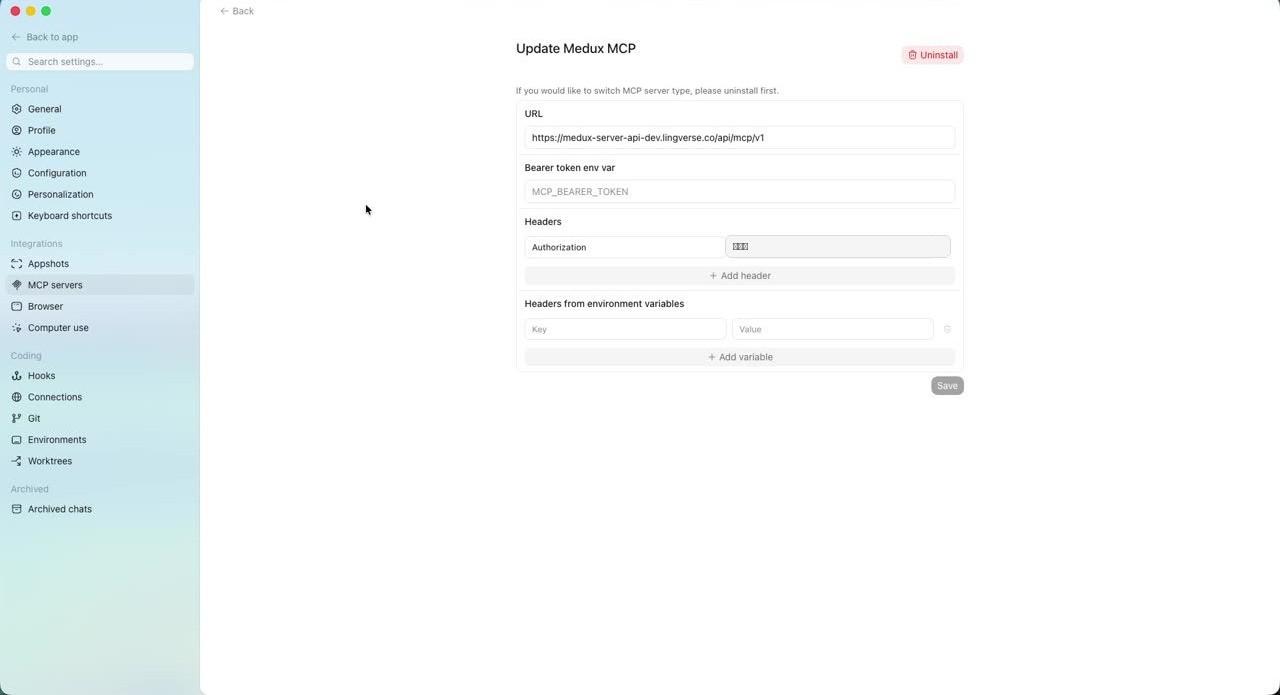
Medux MCP Server configured in Codex settings
Configure Medux under MCP servers. The API token in this screenshot has been redacted.
02

Ask Codex to clone and synthesize the voice

Return to the test_mudex project and describe the task in natural language. Include the reference audio path and the text file path. Codex will inspect the files and choose the relevant Medux MCP tools.

Use Medux MCP to clone the voice from the reference audio file /Users/chuan/projects/test_mudex/reference_voice.wav and synthesize speech using the text contained in /Users/chuan/projects/test_mudex/tts.txt.

A slightly more production-friendly version is:

Use Medux MCP to clone the voice with the reference audio /Users/chuan/projects/test_mudex/reference_voice.wav, then synthesize speech from the text in /Users/chuan/projects/test_mudex/tts.txt. Save the generated audio file in the current project directory and tell me the output path.
03

Approve the Medux upload tool call

Codex first reads tts.txt and checks reference_voice.wav. It then asks permission to call medux_file_create_upload_url, create an upload URL, and send the WAV file to Medux.
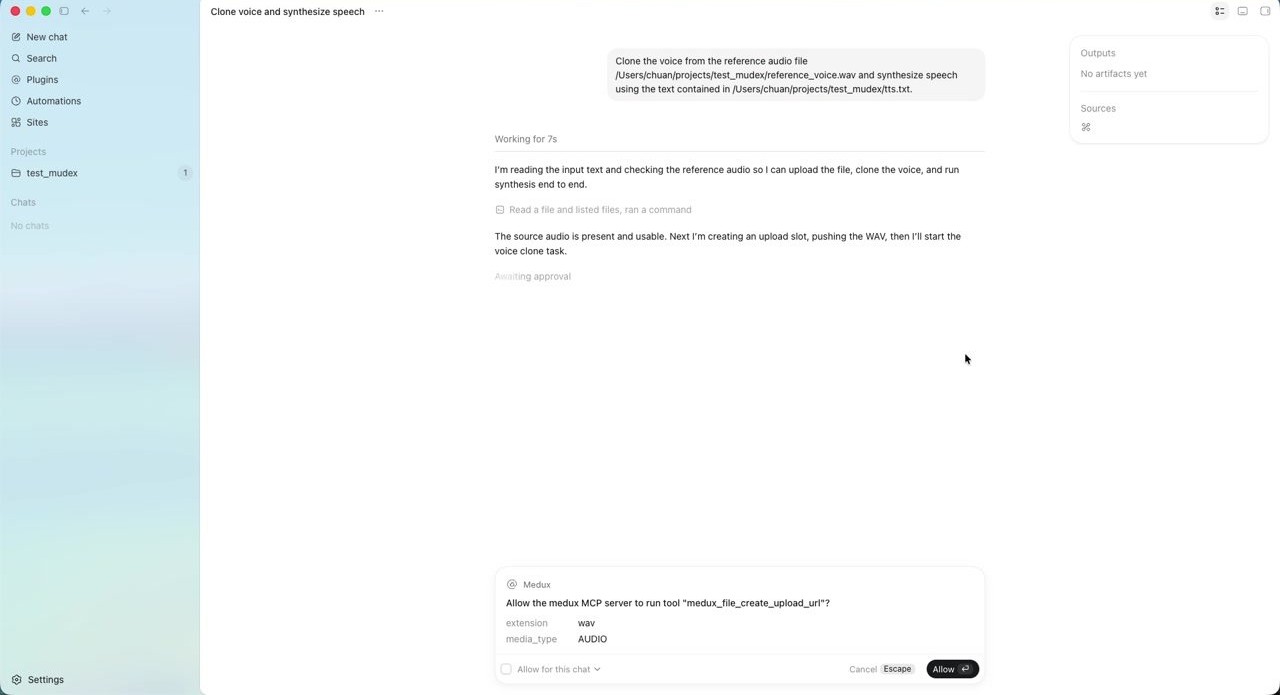
Codex asks for approval to call the Medux upload tool
When Codex requests an MCP tool call, review the action and click Allow if it matches the intended task.
04

Create the voice cloning task

After the reference audio is uploaded, Codex calls medux_clone_voice to create a voice cloning task. In the recording, the task title is similar to Clone voice from reference_voice.wav.
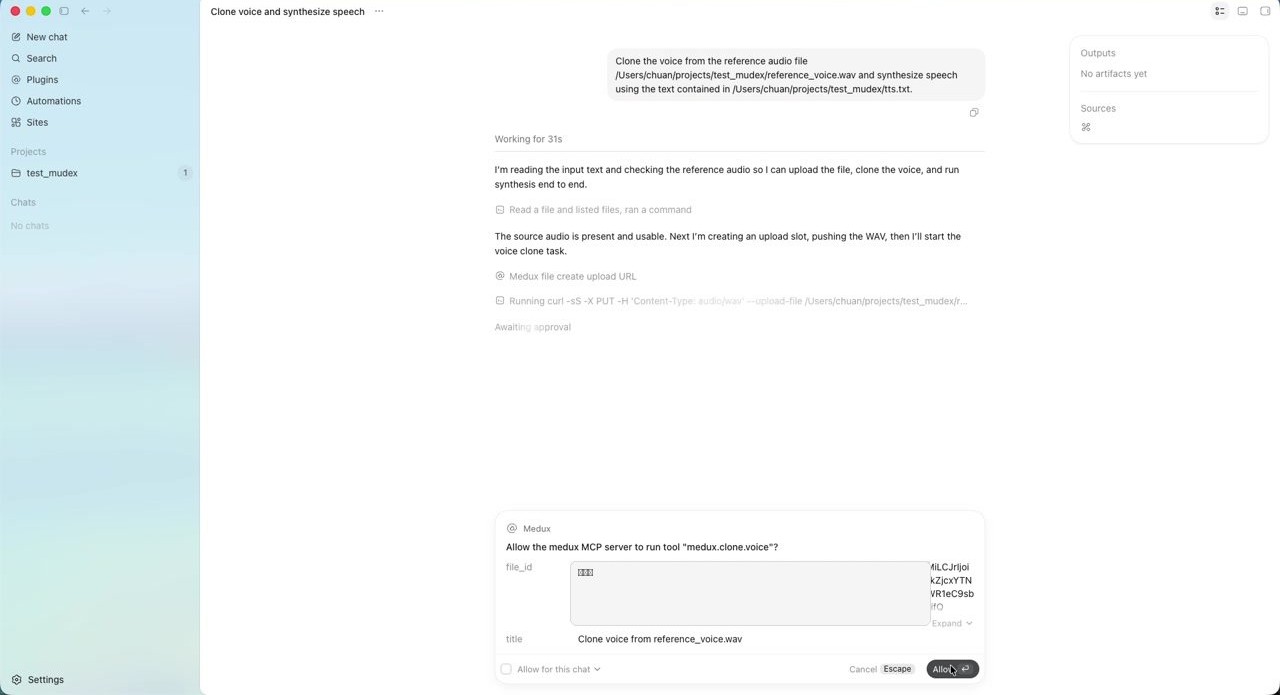
Codex calls Medux to create a voice cloning task
Codex sends the uploaded file ID and voice-cloning parameters to Medux. Long IDs in this screenshot have been redacted.
05

Poll the clone task and run synthesis

Voice cloning is asynchronous. Codex keeps checking the task status until the cloned voice asset is ready. It then passes the contents of tts.txt to the Medux synthesis tool.
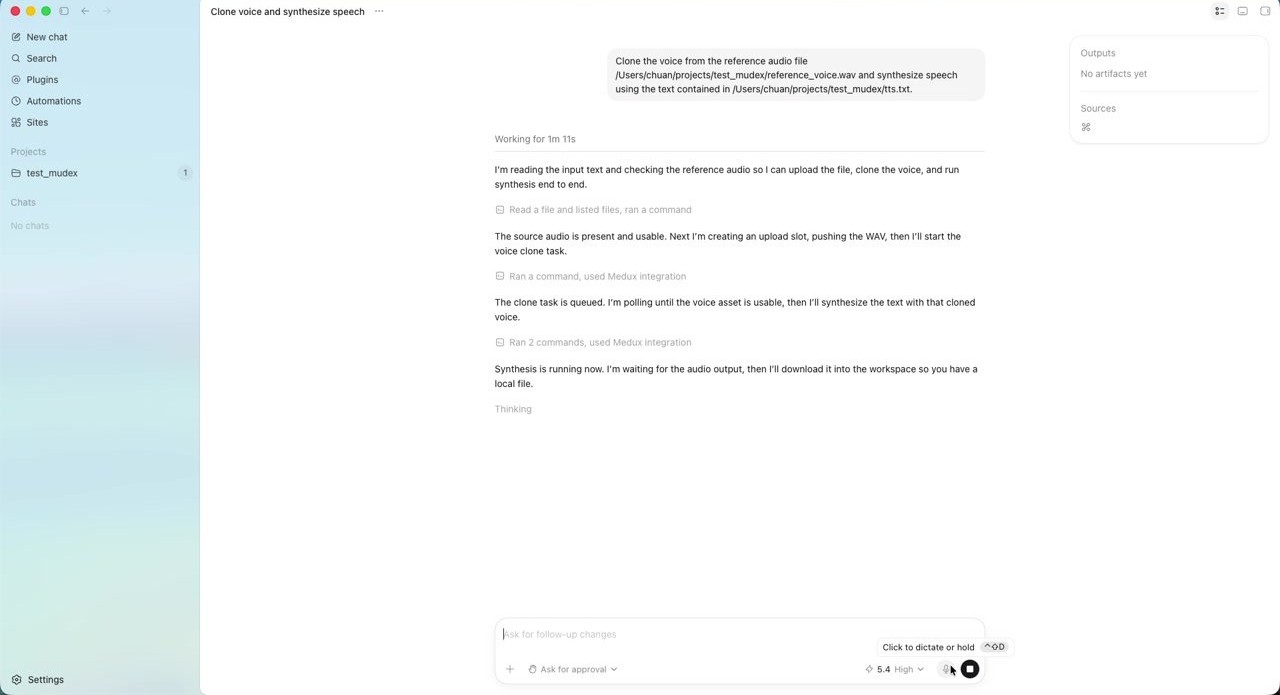
Codex waits for the Medux synthesis output
Codex handles the polling and synthesis flow automatically, so there is no need to manually copy task IDs or rerun status checks.
06

Save the generated audio locally

When synthesis is complete, Codex downloads the result into the current project directory. In the video, the generated file is:

synthesized_from_cloned_voice.wav

The Finder view confirms that the WAV file is available in test_mudex. You can now preview it, edit it, or pass it into a downstream production pipeline.
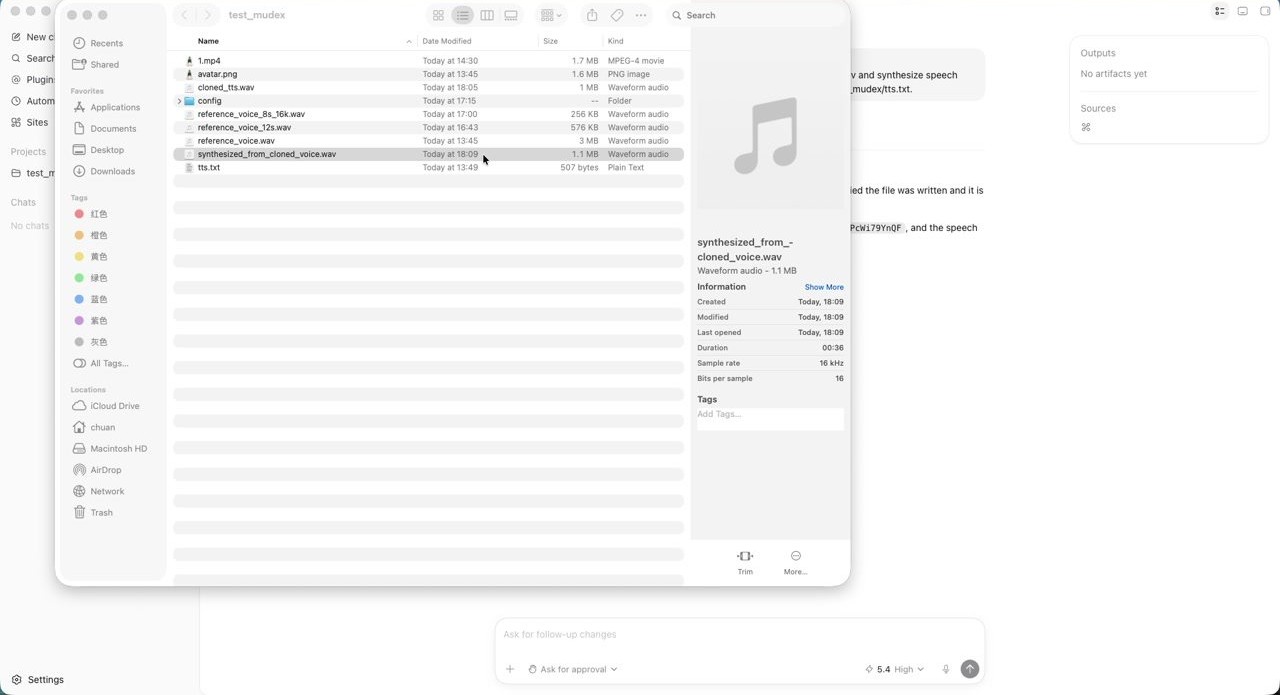
Finder shows the generated synthesized_from_cloned_voice.wav file
The generated file is saved locally as a WAV file. In the recording, its duration is about 36 seconds.

Workflow recap

The workflow is simple: the user gives Codex a goal, Codex orchestrates the MCP tool calls, and Medux performs voice cloning plus speech synthesis.

Prepare reference audio
Prepare synthesis text
Connect Medux MCP
Let Codex call tools
Generate local WAV
reference_voice.wav + tts.txt
        ↓
Codex reads the local files and creates an upload URL
        ↓
Medux receives the reference audio and creates a voice clone task
        ↓
Codex polls the task status until the cloned voice is ready
        ↓
Medux synthesizes the text from tts.txt with the cloned voice
        ↓
synthesized_from_cloned_voice.wav

Why connect Medux through MCP?

Without MCP, developers usually need to implement file reading, upload URLs, authentication, asynchronous task creation, status polling, synthesis requests, result downloads, and error handling themselves.

With MCP, those capabilities are exposed as structured tools that Codex can understand and call. The user describes the intended outcome, Codex decomposes the work, and Medux executes the voice generation pipeline.

In one sentence: MCP lets Codex call Medux voice-production tools, and Medux turns a natural-language Codex task into a real generated audio file.

Pre-publish checklist

This page is a single self-contained HTML file. The screenshots are embedded as Base64 data URIs, so no separate image upload is required. Before publishing, review the following items:

Confirm no real API key is visible
Confirm the reference voice is authorized
Replace demo paths if needed
Add product links or CTAs
Test the page on mobile widths
Keep the responsible-use note

Explore related workflows

Continue with a nearby Medux workflow or compare how the same task works across Claude MCP and Codex MCP.

Quick answer

How do I run Voice Cloning and Speech Synthesis with Codex MCP?

Codex can use the Medux voice-cloning and speech-generation tools through Medux MCP to clone a reusable voice from reference audio and synthesize a new spoken track. The workflow identifies the exact inputs, reviews the tool arguments, monitors processing, and verifies the returned result.

What does this Medux tutorial cover?

Codex can use the Medux voice-cloning and speech-generation tools through Medux MCP to clone a reusable voice from reference audio and synthesize a new spoken track. The workflow identifies the exact inputs, reviews the tool arguments, monitors processing, and verifies the returned result.

Related topics: Voice Cloning and Speech Synthesis · Voice Cloning and Speech Synthesis with Codex MCP · Medux MCP tutorial